
How to migrate from Zoho Books or RazorpayX to Smart Dhandha
TL;DR: Switching to Smart Dhandha takes about 30 minutes and doesn't disrupt your filings. You export your master data (employees, clients, past filings) from your current tool, set up your business profile in Smart Dhandha so it generates the right compliance calendar, assign your CA, and run parallel for one cycle before fully switching. No data is lost, and you keep filing on the government portal throughout. Here's the exact checklist.
Before you start: what you're actually moving
You're not migrating "an accounting file." You're moving three things:
- Master data — employees, clients/vendors, salary structures.
- Compliance state — which filings apply, what's been filed, what's pending.
- Ongoing operations — invoicing, payroll runs, reminders.
Smart Dhandha rebuilds your compliance calendar from your profile, so most of the "migration" is just telling it who your business is — not importing years of ledgers.
Step 1 — Export your data from your current tool
From Zoho Books: export Contacts (customers/vendors), Items, and Employees as CSV (Settings → Export). If you use Zoho Payroll, export the employee master and salary components.
From RazorpayX / RazorpayX Payroll: export your employee list, salary structure, and recent payslips/statutory reports (PF/ESI/TDS) so you have a record of what was paid.
From a spreadsheet: you're already done — keep the sheet open to copy over.
Always keep: your last few filing acknowledgements (GST, TDS, ROC) so you can record what's already been filed this year.
💡 Tip: You don't need to import historical ledgers to start. You need today's master data and your current-year filing status.
Step 2 — Set up your business profile in Smart Dhandha
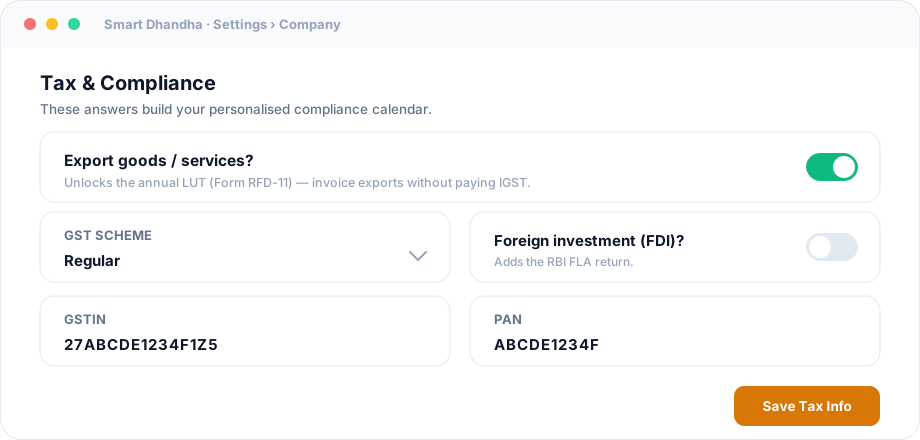
This is the step that makes everything else automatic. In Settings → Company, set:
- Entity type — Proprietorship / Partnership / LLP / Private Limited.
- GST — registered or not, and regular vs composition scheme.
- Exporter? — turn on if you export goods/services (unlocks the LUT).
- Foreign investment? — turn on if you have FDI (adds the FLA return).
- PF / ESI / Professional Tax — based on your team.
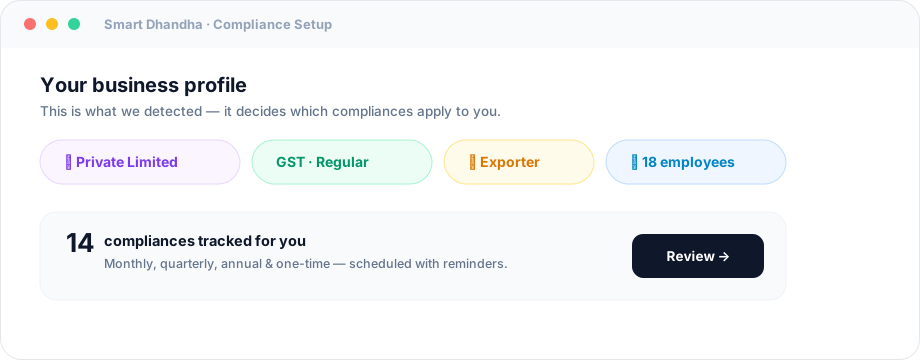
The moment you save, Smart Dhandha generates your compliance calendar — only the filings that apply, on the correct dates.
Step 3 — Import your people and clients
Add your employees (or import the CSV) so payroll statutory compliance (TDS, PF, ESI, Form 16) switches on automatically. Add your clients/vendors so invoicing and vendor-TDS are ready. This mirrors what you exported in Step 1.
Step 4 — Record what's already filed this year
For the current financial year, mark the filings you've already completed (GSTR-3B for past months, any TDS returns, ROC if done) and store their acknowledgement numbers against each. Now your tracker reflects reality from day one — no phantom "overdue" items.
Step 5 — Assign your CA or team
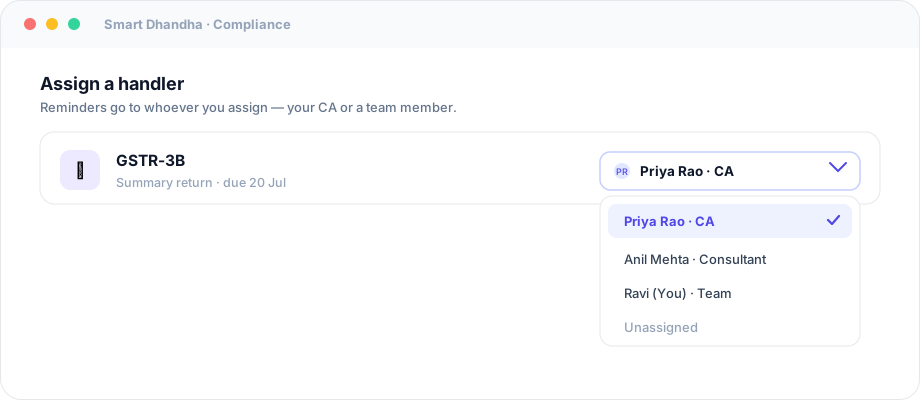
Add your CA/consultant as a handler and assign each filing to the right person. From now on, reminders go to both you and them — replacing the old WhatsApp-nudge model with shared, accountable visibility.
Step 6 — Run parallel for one cycle (recommended)
For your first month, keep your old tool active and let Smart Dhandha run alongside it. Confirm the calendar matches your real obligations and that reminders arrive. After one clean cycle, switch over fully and cancel the subscriptions you no longer need.
Migration checklist
- Export contacts, items, employees from your current tool
- Save last few filing acknowledgements (GST/TDS/ROC)
- Set entity type + GST scheme in Settings → Company
- Turn on Exporter / Foreign investment / PF / ESI / PT as applicable
- Add or import employees and clients/vendors
- Mark already-filed items for the current FY (with ack numbers)
- Add your CA and assign handlers
- Verify your personalised calendar looks right
- Run parallel for one cycle, then switch fully
What you gain after switching
- One tracker for GST + TDS + payroll + income tax + ROC + one-time registrations — instead of a tool per silo.
- Personalised deadlines, not a generic calendar you have to filter.
- Reminders to you and your CA, with proof storage.
- Invoicing, payroll and banking/ledgers in the same cockpit.
Frequently asked questions
Will I lose my data migrating to Smart Dhandha?
No. You export your master data (contacts, employees) from your current tool and set up your profile in Smart Dhandha. Your historical records stay with your old tool/CA; Smart Dhandha builds your live compliance tracker going forward.
Do I have to stop filing during migration?
No. You keep filing on the government portals throughout. Smart Dhandha tracks and reminds; it doesn't interrupt any in-progress filing. Running parallel for one cycle means zero risk.
How long does migration take?
Around 30 minutes for the core setup — profile, people, and marking current-year filings. The optional parallel-run cycle just means you switch fully after one month of confidence.
Can I migrate from a spreadsheet?
Yes, and it's the easiest path — copy your employees and clients across, set your profile, and let Smart Dhandha replace the static sheet with a live, self-reminding calendar.
Can my CA still work the way they do?
Yes. Add them as a handler, assign filings to them, and they get the reminders. They keep filing on the portal — now with a clear, shared checklist instead of chasing you on WhatsApp.
Make the switch this week
The best time to move is right after a filing cycle, when your slate is clean. Set up your profile, and Smart Dhandha will show you your entire year at a glance.
Start your migration free → · Compare tools in the 2026 compliance software guide · Check every FY 2026-27 due date.
General guidance as of July 2026. Export steps for third-party tools follow their current UI — check the vendor's help docs. Confirm your compliance setup with your CA.